
Edit Web Source Code from Context Menu
Overview
The software enables users to access and edit source code directly from the context menu in web browsers. Designed for developers and technical professionals, it supports multiple web markup and scripting languages, including (X)HTML, JavaScript, CSS, MathML, SVG, and XML. This functionality streamlines the process of inspecting and modifying code during development or debugging sessions.
By integrating with the right-click menu, the tool allows immediate access to source code without requiring manual navigation through browser developer tools. This can be especially useful when working with complex web applications or when rapid prototyping is needed. The software is particularly suited for front-end developers, web designers, and QA engineers who frequently interact with web source files.
Developed by asamuzaK, the tool is distributed as a free desktop application. It does not include built-in code editing capabilities but requires an external editor to be configured via a host application. The developer did not provide additional details about the software’s architecture or underlying framework.
Key Features & Capabilities
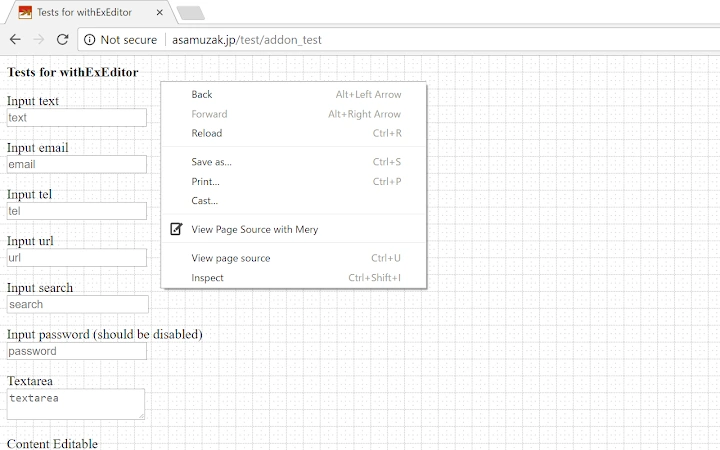
- Context Menu Integration – Adds “View source,” “View selection,” and “Edit text” options to the right-click menu across supported web pages.
- Multi-Format Support – Works with (X)HTML, JavaScript, CSS, MathML, SVG, XML, and other structured text formats commonly used in web development.
- External Editor Integration – Enables users to launch their preferred code editor through a host application, allowing seamless editing workflows.
- Lightweight Design – With a file size of 2.1 MB, the software is compact and designed for minimal system impact.
- Open-Source Foundation – Built as a community-driven project, the tool relies on external components such as withExEditorHost for full functionality.
For example, a developer can right-click on a section of a webpage, select “Edit text,” and instantly open the selected code in their preferred editor. This reduces context switching and improves workflow efficiency. The tool is ideal for quick edits during debugging or when testing small changes in a live environment.
User Interface, Workflow & Performance
The user interface is minimal and relies entirely on system-level context menu integration. There is no standalone GUI or dashboard, which keeps the application lightweight and focused. Users interact with the tool exclusively through the right-click menu in supported browsers.
Workflow efficiency is enhanced by eliminating the need to open browser developer tools or copy-paste code manually. The process is streamlined: right-click → select action → edit in external editor. This reduces time spent on repetitive tasks and improves focus during development.
Performance observations are based on general software behavior patterns. The developer did not specify resource usage details. No information was provided about CPU or RAM consumption. Stability is assumed to be consistent with similar lightweight desktop utilities, but real-world behavior may vary depending on the host application and editor configuration.
Compatibility & System Requirements
The software is compatible with Windows and Mac operating systems. It supports the latest versions of major web browsers that allow context menu modifications. The installation size is 2.1 MB, indicating a lightweight footprint.
Exact system requirements were not listed. The developer did not provide information about minimum CPU, RAM, or storage needs. Compatibility with older operating system versions is unclear. The tool requires a separate host application to execute the external editor, which must be downloaded separately from the developer’s repository.
Pros and Cons
Pros
- Direct access to source code via right-click menu
- Supports multiple web development formats
- Lightweight at just 2.1 MB
- Free to use with no licensing restrictions
- Integrates with any external code editor
Cons
- Requires additional setup with a host application
- No built-in editor or GUI
- Performance and resource usage not specified
- Compatibility with older OS versions unknown
- Relies on external dependencies for core functionality
FAQ Section
Is the software free to download and use?
Yes, the software is available at no cost. It is distributed as a free desktop application with no hidden fees or subscription models.
What operating systems does it support?
The software is compatible with Windows and Mac operating systems. Specific version support for each OS was not provided by the developer.
Do I need to install a separate editor to use this tool?
Yes, the tool does not include a built-in code editor. It requires a host application and an external editor to function. The host can be downloaded from the developer’s GitHub repository.
Is the software secure to use?
As a desktop application that integrates with web browsers, it operates under standard system permissions. The developer did not provide a security audit or detailed privacy policy.
How often are updates released?
Update frequency is not specified. The latest version available is 1.0, released on April 5, 2024. Future updates depend on the developer’s release schedule.
Final Thoughts
This tool offers a practical solution for developers seeking faster access to web source code. Its ability to launch code editing directly from the context menu significantly reduces workflow friction, especially during debugging or rapid prototyping. While it lacks a standalone interface and requires external setup, its lightweight design and compatibility with any editor make it a valuable addition to a developer’s toolkit.
For front-end developers, web testers, and technical professionals who work extensively with HTML, CSS, and JavaScript, this software delivers a focused, efficient experience. The free model and open-source foundation further enhance its appeal.
Download Edit Web Source Code from Context Menu now







